REST API & the agent skill (for developers)
Every VidFarm workflow — discover, fork, edit, render, approve — is a plain HTTP call authenticated with one header. Install the vidfarm skill and an AI agent can drive the whole platform for you.
Key takeaways
- Every workflow is raw REST at
https://vidfarm.cc— the UI and CLI just wrap it. - Authenticate with the header
vidfarm-api-key: <key>— notAuthorization: Bearer. - Install the vidfarm skill so any capable agent gains VidFarm's operating knowledge.
- Make an expensive submit safe to retry with an
Idempotency-Keyheader — the same key replays the original job instead of charging twice.
It's all just REST
There is no private API. Everything you can do in the VidFarm web app — browse the discover feed, fork a template, mutate a composition, render it, approve it into a post — is a documented HTTP endpoint. The web copilot and the vidfarm CLI are both thin clients over the same routes, so anything a human or the CLI can do, your own code or an AI agent can do too.
Two facts make this easy. First, the base URL is always https://vidfarm.cc. Second, you authenticate with a single header: vidfarm-api-key: <your key>. That's it — no OAuth dance, no Authorization: Bearer.
The fast pathPoint an AI agent at the skill
You almost never need to hand-write these calls. The vidfarm skill teaches Claude Code, Codex, or any capable agent the entire REST/CLI playbook — the three paintbrushes, the fork-to-render loop, the whole director workflow. Install it once and just describe what you want.
vidfarm
Copy the full REST + CLI playbook into your agent, or grab the one-line install command from the ⋮ menu.
-
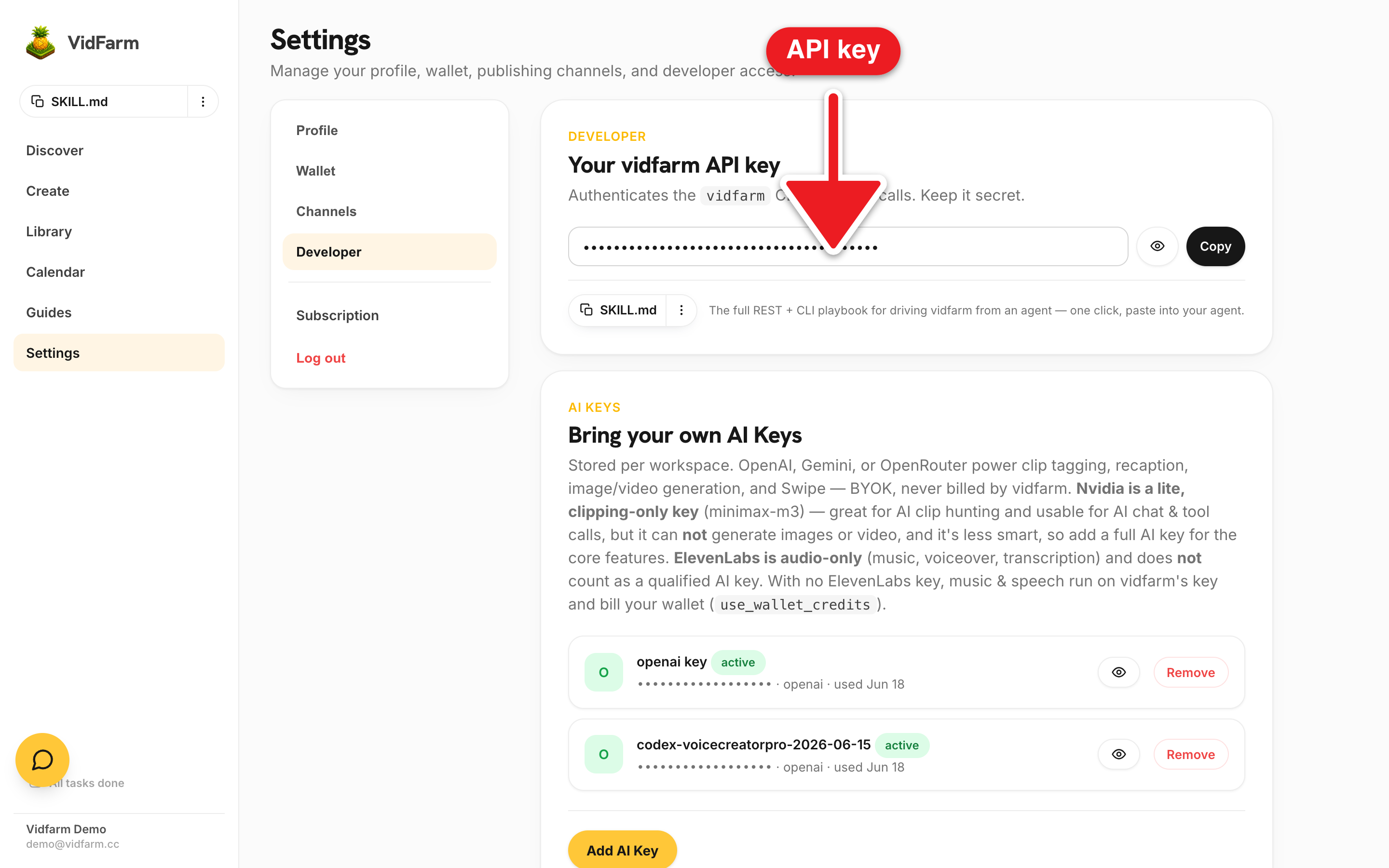
Copy your VidFarm API key
Open Settings → Developer , find Your vidfarm API key ("Authenticates the
vidfarmCLI and REST calls. Keep it secret."), reveal it, and Copy. -
Set it in your environment
In the project where your agent lives, run
export VIDFARM_API_KEY=<key>so both raw REST and the CLI can authenticate. -
Add BYOK AI keys
Under Bring your own AI Keys on the same page, add an OpenAI / Gemini / OpenRouter key (and optionally Nvidia (clipping only) or ElevenLabs (audio only)) so REST generation and clip routes have a provider to call.
-
Install the vidfarm skill
Grab it via the one-click agent skill control on Settings → Developer and paste into your agent, or install it directly from GitHub.
# install the vidfarm skill into your agent (once)
npx skills add https://github.com/officexapp/vidfarmUnder the hoodThe raw HTTP, if you want it
Prefer to call the endpoints directly? Every route takes the same header. Here's the canonical read — the discover feed:
curl --fail-with-body \
  -H "vidfarm-api-key: $VIDFARM_API_KEY" \
  -H "accept: application/json" \
  "https://vidfarm.cc/discover/feed?limit=20"
And here's the core automation loop — fork a template, mutate it, render, and poll until it's done. This is the exact sequence the CLI and the agent skill run for you:
# 1. fork a template → a new composition (returns fork_id)
curl --fail-with-body -X POST \
  -H "vidfarm-api-key: $VIDFARM_API_KEY" \
  -H "content-type: application/json" \
  -d '{"template_id":"template_xxx"}' \
  "https://vidfarm.cc/api/v1/compositions"

# 2. read + write the composition files
curl -H "vidfarm-api-key: $VIDFARM_API_KEY" \
  "https://vidfarm.cc/api/v1/compositions/$FORK_ID/composition.html"   # GET, then PUT your edit back
#   PATCH /api/v1/compositions/$FORK_ID/composition.json  (shallow-merged, not JSON Patch)

# 3. render (returns a renderId), then poll until SUCCEEDED
#    the Idempotency-Key makes a retried submit safe — reusing it returns the
#    SAME job instead of queuing (and charging for) a second render.
curl --fail-with-body -X POST \
  -H "vidfarm-api-key: $VIDFARM_API_KEY" \
  -H "content-type: application/json" \
  -H "Idempotency-Key: my-first-render-01" \
  -d '{"tracer":"my-first-render"}' \
  "https://vidfarm.cc/api/v1/compositions/$FORK_ID/render"
# poll GET /api/v1/compositions/$FORK_ID/renders/$RENDER_ID until status == SUCCEEDED- The full multi-file spec lives in the
vidfarmskill'sreferences/(core-workflows, editor-workflows, assets-and-sourcing, automation-and-local-dev, primitives, rest-api). The web copilot loads slices on demand. - Template operations run async:
POST /api/v1/templates/:templateId/operations/:operationNamereturns202+ ajob_id; pollGET /api/v1/user/me/jobs/:jobId. composition.jsonis shallow-merged server-side — send only the keys you're changing. Parse and re-serializecomposition.htmlas DOM, never string-concatenate.
Idempotency-Key header (or an idempotency_key body field) on POST .../render and any POST /api/v1/primitives/* submit, and a retry reusing that key returns the original job — no second job, no second charge. Keys are scoped to your account and expire after 24 hours, so the same string is free to reuse later. The tracer is not a dedupe key — it's just a label, and many jobs can share one. Without an Idempotency-Key, submits stay non-idempotent (every POST is a fresh job and charge), so still check render status before blindly retrying an un-keyed submit.$ curl -s https://vidfarm.cc/api/v1/user/me \
-H "vidfarm-api-key: vf_key_•••••"
{
"customer": {
"id": "cus_6e94…",
"email": "demo@vidfarm.cc",
"name": "Vidfarm Demo",
"isPaidPlan": true,
"planTier": "client"
}
}Where to go next
Want the terminal ergonomics and free local rendering? Install the CLI next — it even serves the full VidFarm frontend on localhost (the editor, discover feed, and library as local web pages, backed by your own disk), then learn the file-backed scripting posture for unattended runs:
Give an agent the keys
Copy your API key from Settings → Developer, install the vidfarm skill, and let an AI agent fork, edit, and render for you — all over plain REST.
Open Settings → Developer