Free mode with NVIDIA credits
Bring a free NVIDIA API key and VidFarm's AI reasoning — clip hunting, chat, and tool calls — runs on their credits. Render locally with the devcli and the whole loop costs $0. The one catch: nvidia can't generate images or video.
Key takeaways
- Free mode = a BYOK NVIDIA key + local rendering. No VidFarm paid plan, no wallet.
- The NVIDIA key is a lite, clipping-only key — pick the
minimaxai/minimax-m3model — that powers AI clip hunting, chat, and tool calls. - It cannot generate images or video — those requests hard-fail. Add a full key (OpenAI / Gemini / OpenRouter) for media.
- Render locally for free with the devcli (in-process HyperFrames) — cloud renders always bill the wallet.
- On the free tier you decompose reference videos yourself — there's no pre-computed grounding.
How free mode actually works
NVIDIA gives away free API credits on their build platform. VidFarm treats Nvidia (clipping only) as a real provider key, so you can point VidFarm's AI at those free credits: it'll hunt and cut clips, run the editor chat, and make tool calls — all on NVIDIA's dime. Pair that with the devcli's local rendering , which runs in-process on your machine for free, and the entire create-a-video loop costs $0 in VidFarm credits.
The trade-off is honest and worth stating up front: the NVIDIA key runs a smaller model (it's "less smart"), and — critically — it can't generate images or video. It's built for clipping and reasoning, not media synthesis.
Manual walkthroughSet up your free NVIDIA key
-
Get a free NVIDIA API key
Grab a key from NVIDIA's build / integrate platform, which comes with free API credits. That key is what powers VidFarm's clipping and chat for free. On NVIDIA's model catalog we specifically recommend
minimaxai/minimax-m3— it's the exact lite model VidFarm's clipping-only mode runs on, so it's the best-matched (and reliably free) choice. -
Add it in VidFarm
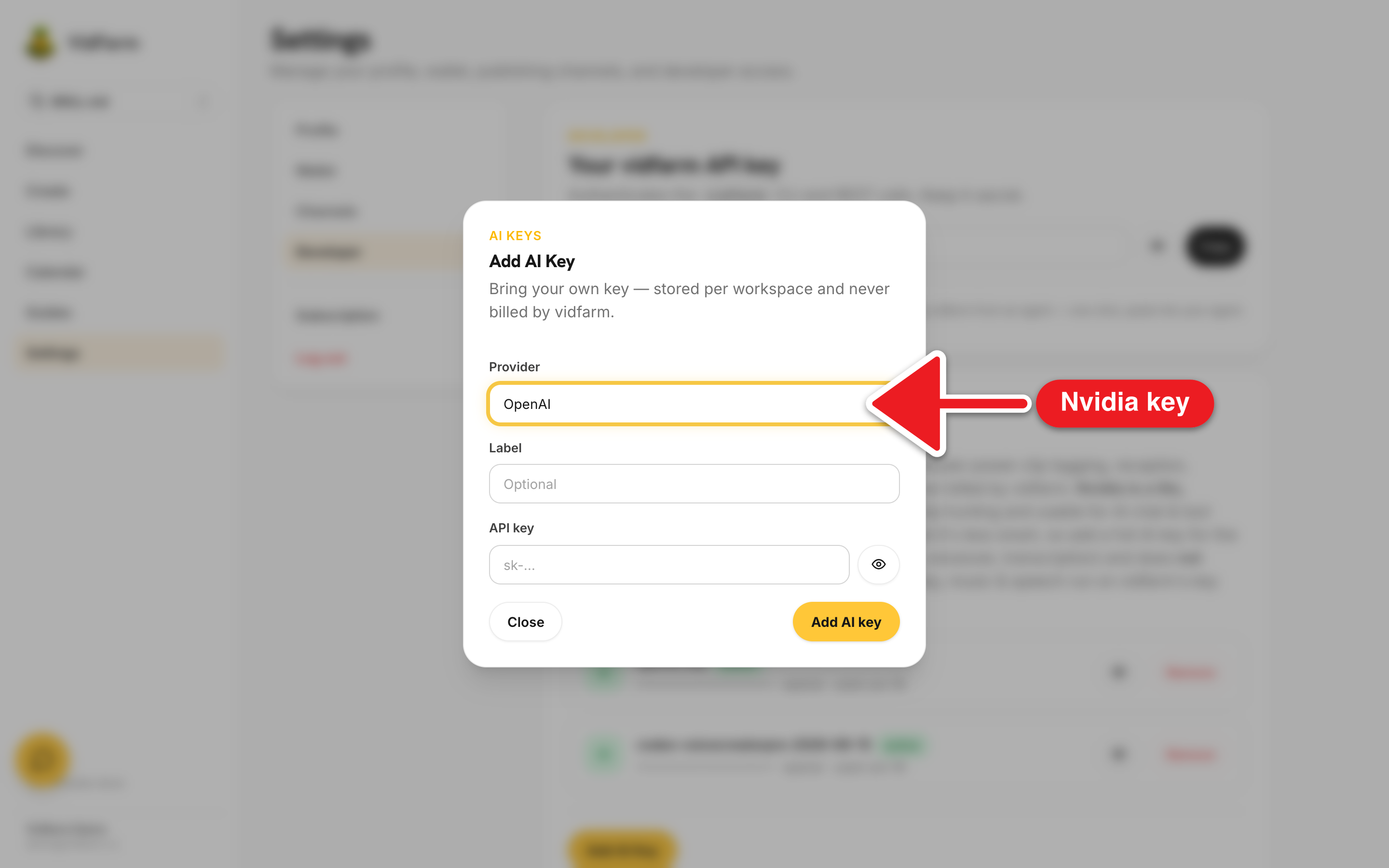
Open Settings → Developer → Bring your own AI Keys → Add AI Key, choose Nvidia (clipping only) from the provider dropdown, and paste the key.
-
Use it for clipping and chat
Now use NVIDIA for AI clip hunting and for the editor chat / tool calls. From the devcli you can select it explicitly on clip commands:
Clip on the NVIDIA keyvidfarm add-provider-key nvidia <secret> vidfarm raws scan clip.mp4 --clip --provider nvidia -
Render locally for free
Boot the editor with the devcli and render in-process — no wallet, no cloud.
--no-cloudguarantees a fully offline, zero-charge run.Free local rendervidfarm serve <template_id> # then click "Render Local (Free)" # or: vidfarm render <forkId> --dir ./work --wait
What nvidia can't doThe one hard limit
The NVIDIA key is deliberately scoped. It's in VidFarm's list of lite, text-only providers, so any image or video generation request fails fast with a clear error instead of silently doing nothing:
- Allowed on nvidia: AI clip hunting / clipping, editor chat, and tool calls.
- Blocked on nvidia: image generation and video generation (hard-fails with the error above).
- Also note: nvidia runs a smaller model, so it's less smart — pair it with a full key for the core generative features.
- ElevenLabs is a separate audio-only key and does not count as a qualified AI key; without it, music/speech run on VidFarm's platform key and bill your wallet.
$ vidfarm images generate "a neon skyline"  # with only an NVIDIA key

Error: LITE_TEXT_ONLY_MEDIA_ERROR
The NVIDIA lite key (minimax-m3) can hunt clips, chat, and call tools,
but it can NOT generate images or video. Add an OpenAI/Gemini/OpenRouter
key in Settings → Developer to unlock media generation.--no-cloud to guarantee $0.Where to go next
Make a video for $0
A free NVIDIA key does the clipping and reasoning; the devcli renders locally in-process. The whole loop costs nothing — just add a full AI key when you want generated media.
Add your NVIDIA key