Agentic video editing — edit by chatting
You describe the outcome in plain English and an AI director does the editing on a real timeline. Here's how it works, the three paintbrushes it paints with, and when to hand the heavy lifting to a local coding agent.
Key takeaways
- The Trackpad Editor is a real timeline (like Premiere/DaVinci) with an AI copilot you chat with.
- You steer with words — the copilot drives edits directly on the live timeline via a declared action verb set.
- Every shot is sourced from one of three paintbrushes: raw clips, HTML/JS hyperframes, or pure AI generation — cheapest to most expensive.
- Two surfaces, same brushes: the web copilot for quick edits, a local coding agent for full rebuilds and batch work.
Editing without dragging clips
Traditional editors make you do the work: scrub the timeline, trim each clip, nudge keyframes, hunt for the right transition. Agentic editing flips that around. You say what you want — "shorten the intro to two seconds and rewrite the hook" — and the AI director makes the edit for you, on a real timeline you can still see and touch.
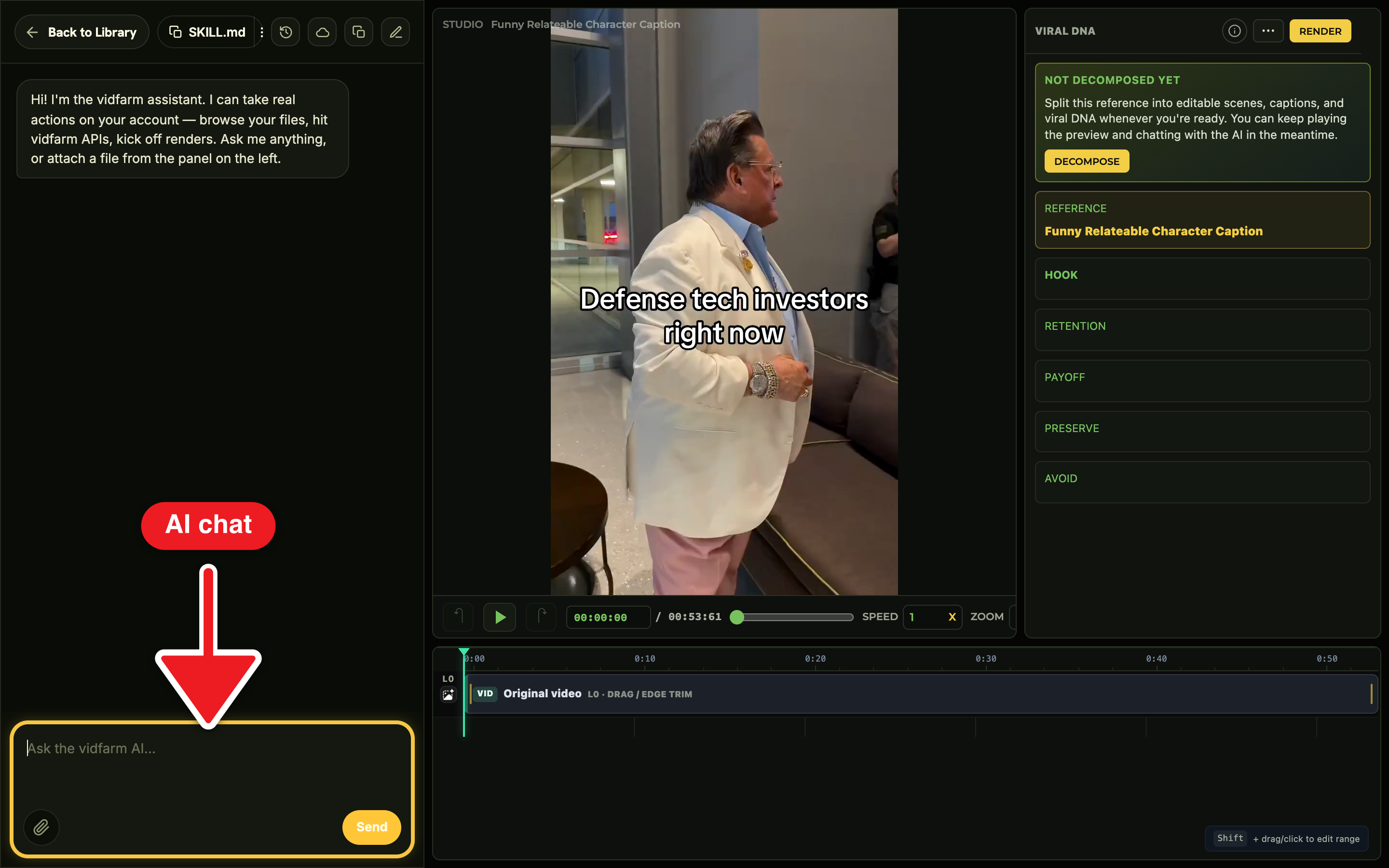
The surface is the Trackpad Editor: a timeline with tracks and layers, plus an AI copilot riding shotgun in a chat dock. When you describe a change, the copilot translates it into concrete edit actions and applies them to the live composition. You watch it happen, then iterate. No blank canvas, no manual dragging — just a conversation that produces frames.
How every shot is sourcedThe three paintbrushes
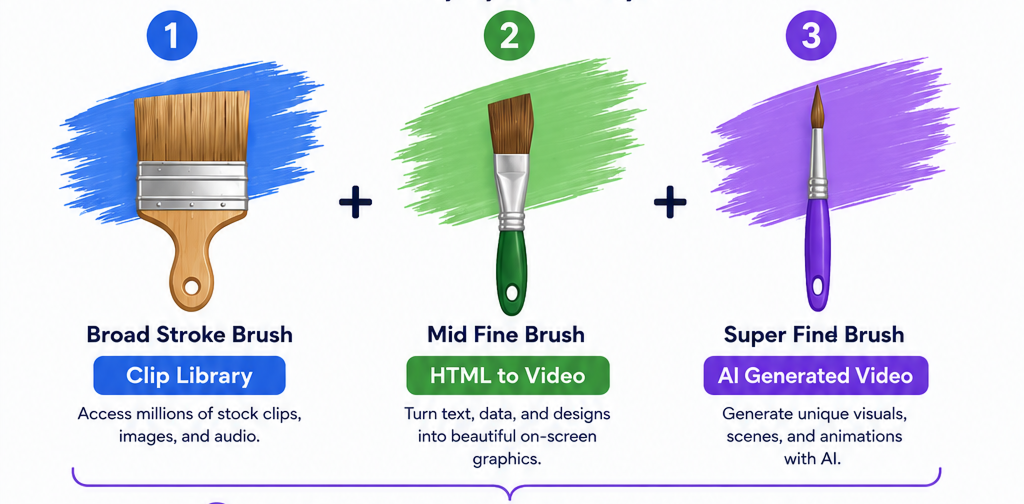
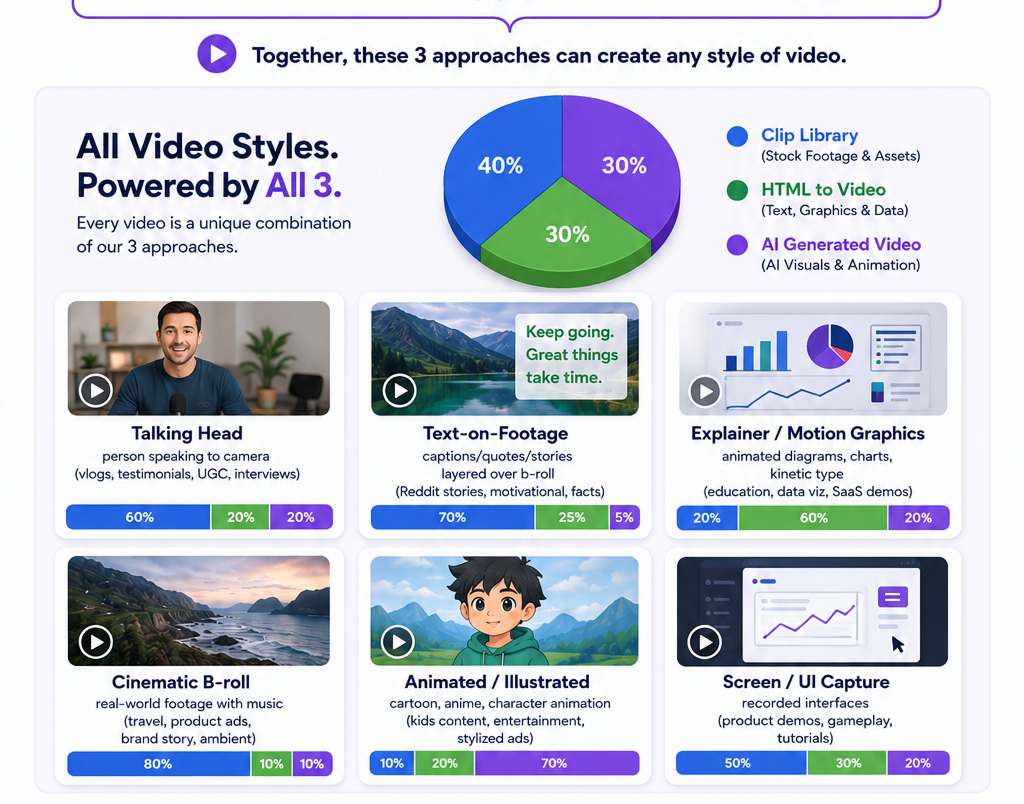
Whatever you ask for, the director builds each shot with one of three tools. Understanding them is the single most useful mental model in VidFarm, because it maps directly to cost — and the director always reaches for the cheapest brush that does the job.
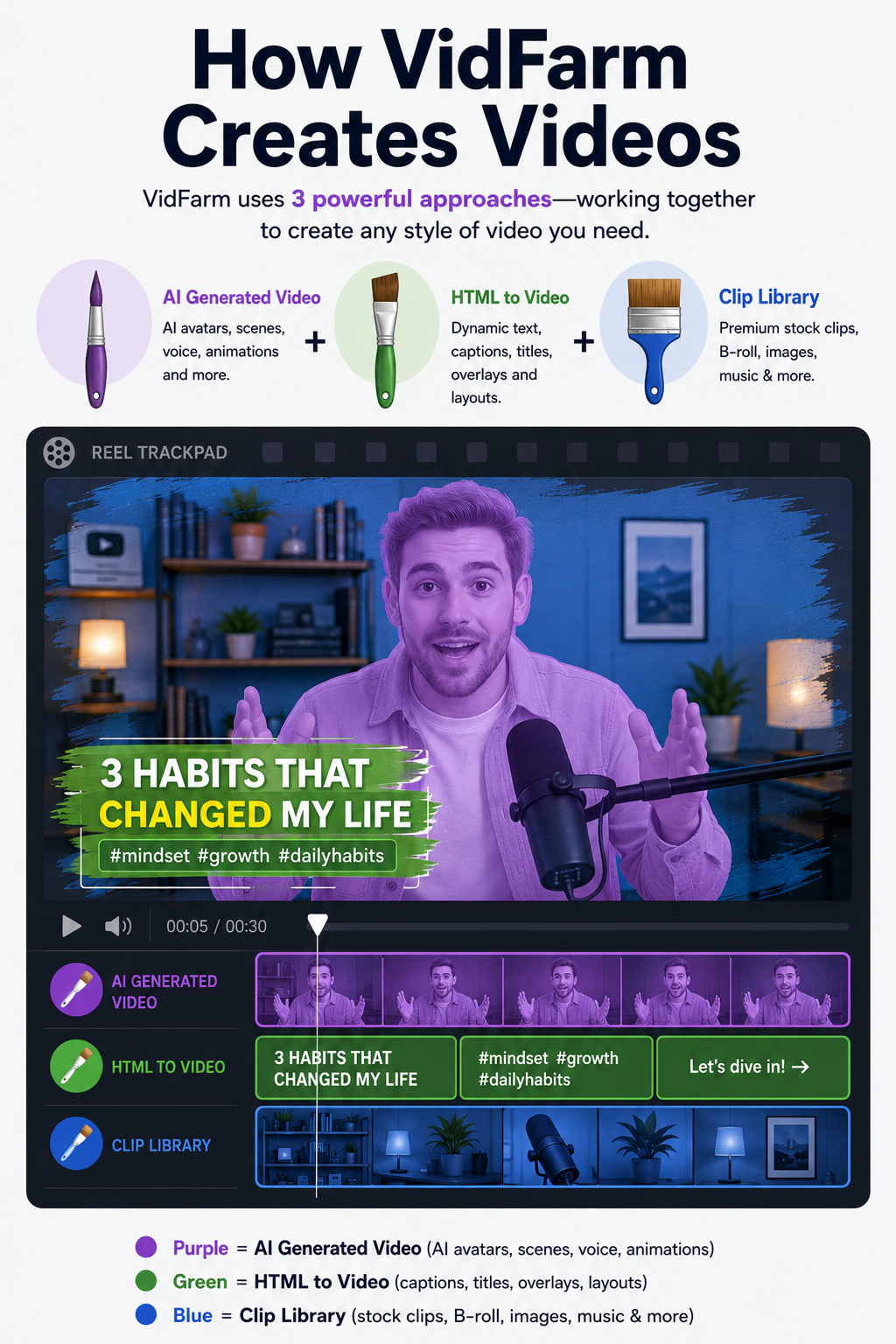
- 1 · Raw clips — cut and remix existing footage (yours, or clipped from a source video). The cheapest brush and the workhorse of short-form. Most viral edits are 90% this.
- 2 · HTML/JS hyperframes — video rendered from HTML, with CSS / GSAP / anime.js motion. Great for kinetic captions, title cards, data callouts, and motion-graphic beats. Cheap, and re-themeable to your brand.
- 3 · Pure AI generation — generated images, video, voice, and music. The most powerful brush and the most expensive — AI video especially — so it's used last, for the shots the other two can't cover.
Manual walkthroughEdit by chatting (the web UI)
Here's the loop in the browser. It's the same whether you're swapping one caption or restructuring a few scenes — you just keep describing changes and the copilot keeps applying them.
-
Open a forked composition in the editor
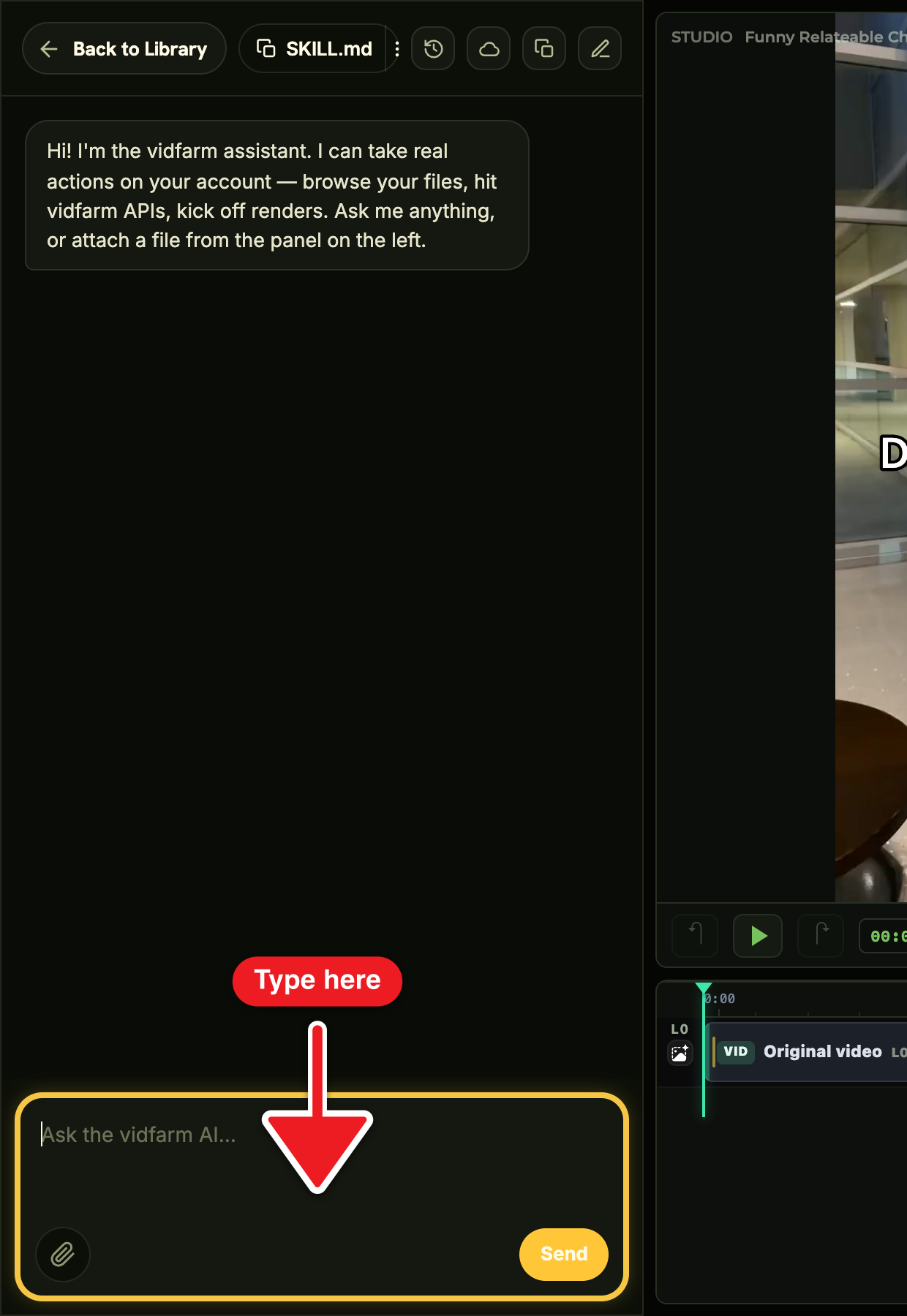
From a template you've forked, you land in the Trackpad Editor . The timeline shows every layer; the chat dock is on the right (jump straight to it with
/editor#chat). -
Describe the edit in plain English
Type what you want: "Replace scene 2 with my product demo and shorten the intro to 2 seconds." Be concrete about which layer or scene and what the outcome is — the copilot targets the exact layer and edits it in place.
-
Watch it apply, then iterate
The copilot applies each change live on the timeline. If it's not quite right, say so — "make the hook bigger", "cut the last beat" — and keep going until it looks right. Small, specific asks land best.
-
Know when to go bigger
For a full multi-scene re-theme, the copilot will proactively recommend handing off to a local coding agent — it can even save a Markdown handoff brief to your My Files . That's your cue to move the heavy job local (next section).
Web copilot vs local coding agentTwo surfaces, same three paintbrushes
Agentic editing runs on two surfaces. They paint with the same three brushes, but they have very different powers — and knowing which is which saves you a lot of frustration.
The web copilot lives in the editor chat dock (also Chat and the Library assistant). It edits the live timeline directly, but it has no shell and no filesystem — and the web editor strips <script> on save, so browser-round-tripped compositions stay declarative (CSS, Ken Burns, transitions, animated captions). It's ideal for short-to-medium edits: caption swaps, a scene or two, a single generation, adding captions, approving and scheduling.
The local coding agent — Claude Code or Codex driving the vidfarm devcli — has a real shell and filesystem, the full edit verb set, JS animation adapters, and free local rendering. It's the one for full rebuilds, batch or scripted work, and render-and-critique loops where the agent grades its own output and tries again.
- Live timeline via chat
- Caption swaps, a scene or two
- Approve & schedule
- No shell / filesystem
- Full shell + filesystem
- Full re-builds, batch work
- JS animation, free local render
- Render-critique loops
Claude Code, OpenAI Codex, Gemini CLI, OpencodeDesktop agents — the preferred way
Desktop agents are the preferred way to use VidFarm. A desktop agent is an AI coding agent running on your own machine — Claude Code, OpenAI Codex, Google Gemini CLI, Opencode — driving the vidfarm devcli with a real shell, a real filesystem, and free local rendering.
The best part is the economics: these agents run on the flat-rate subscription you probably already pay — the ~$20/month plan from Anthropic or OpenAI. All the thinking, planning, and editing loops the agent does are covered by that subscription, so you save money and never spend more than your $20/month on the agent side. Your VidFarm wallet is only touched when a job genuinely needs it (an AI generation, a cloud render) — the conversation itself costs you nothing extra.
- Claude Code (Anthropic) — install & docs . Runs on your Claude subscription.
- OpenAI Codex — install & docs . Runs on your ChatGPT subscription.
- Google Gemini CLI — install & docs . Google's open-source terminal agent.
- Opencode Agent — install & docs . Open-source, works with any model provider.
vidfarm skill (below), and every workflow in this post runs from your terminal at no extra per-token cost.vidfarm
Copy the full REST + CLI playbook into your agent, or grab the one-line install command from the ⋮ menu.
load_skill(...) call away in-place for an installed agent. New to installing the skill? That's the register & setup chapter.Where to go next
Now you know the model: chat to edit, three brushes cheapest-first, two surfaces for small vs big. From here, set up your account and try the gentlest first edit:
Try editing by chat
Open a template, fork it, and tell the copilot one thing to change. The three paintbrushes and two surfaces make more sense the moment you watch an edit land on the timeline.
Open the Discover feed